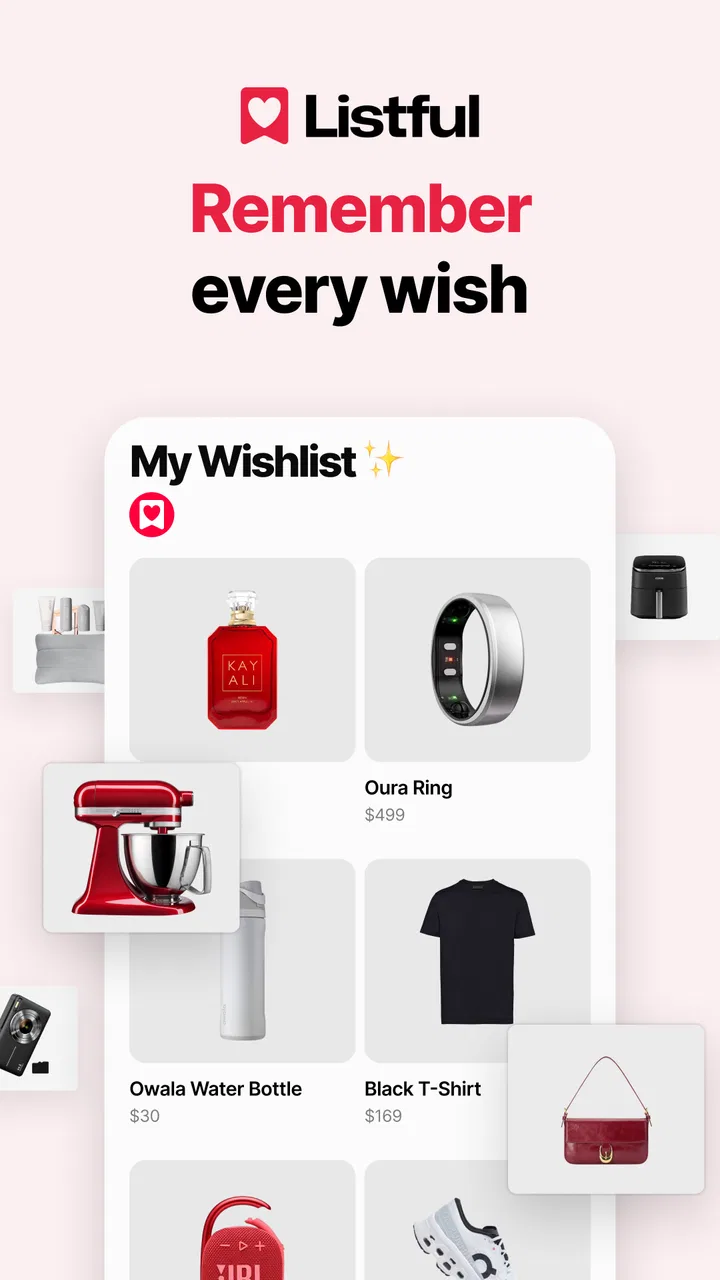
Wishlist Maker - Listful
- 4.6
- Rating
- 100.00K
- Installs
- Free
- Price

 Analysis by App-foxy
I like the idea behind Wishlist Maker - Listful because it tackles a small but surprisingly persistent problem: keeping gift ideas in one place without forcing friends and family to search through several shopping apps. After using it as a lifestyle app, my impression is that its real value is not simply making a list. It is turning scattered product ideas into something other people can actually use when a birthday, holiday, wedding, or family celebration arrives.
The app is free to install, and Listful is the developer behind it. Its central approach is straightforward: collect items from different stores, organize them into a wishlist or gift registry, and share the result through one destination. That makes it more practical than a note on my phone, while keeping it less complicated than building a full event-planning system.
My overall view is positive, with one important qualification. Listful works best when the main problem is gift coordination, not personal shopping management. If you want a clean way to show others what you would genuinely enjoy, it has a clear purpose. If you need detailed budgeting, inventory tracking, or a powerful collaborative planning workspace, a spreadsheet or a dedicated shopping tool may still suit you better.
You May Also Like

 Blood Strike: 2.5 Anniversary
Blood Strike’s Loadouts Turn Every Drop Into a Tactical Gamble
A close look at Blood Strike’s custom loadouts: how fast access to signature weapons reshapes its battle royale rhythm, rewards preparation, and narrows the gap between fights.

 Pandora - Music & Podcasts
Pandora’s Music Is Easy to Start, but Harder to Recover
Pandora’s strength is its low-effort path from a seed to a station. Its weak spot is how much confidence it asks you to place in connection, setup, and quiet recovery.

 8 Ball Pool
 Is Built on Rivalries, Rematches, and Routine
A close look at the rivalries, rematches, shared routines, and unanswered safety questions that turn a quick pool match into a persistent mobile community.

 Samsung Music
’s Quiet Strength Is Playing What You Already Own
Its reach comes less from spectacle than from dependable access to a personal library. That simplicity is both the app’s strongest retention engine and its ceiling.

 AccuWeather: Weather Radar
AccuWeather Review: A Quick, Clear Forecast for Everyday Decisions
For everyday plans, the best forecast is the one you can understand quickly. AccuWeather makes rain timing, radar, and local conditions easy to act on, with a few trade-offs.

 Hill Climb Racing
Why Hill Climb Racing Still Turns Crashes Into One More Run
A tiny car, a bumpy hill and one more upgrade: Hill Climb Racing keeps resurfacing because its simple chaos makes every near-miss feel personal.
More From Our News Desk
View All News


How Listful feels in everyday use
The first useful habit is adding an item as soon as you discover it. Instead of copying a product name into a notes app and later trying to find the same page again, I can treat the wishlist as a holding place for ideas. That is especially helpful for items I like but do not need immediately: books, kitchen tools, clothing, hobby supplies, home accessories, or a larger purchase I would rather receive as a gift.
The “from any store” approach also changes how I think about a wishlist. I am not limited to products from one retailer. A list can reflect how people actually shop, where one item might come from a specialist store and another from a familiar marketplace. That makes the final list feel more personal and less like a single-store shopping cart.
Sharing through one link is the other major convenience. I would rather send one current list than answer the same message repeatedly with several product pages. For a family group, this reduces friction. Someone looking for a gift can open the shared list, choose an idea, and avoid asking me for a recommendation that may accidentally spoil the surprise.
A realistic example is a birthday coming up while I am browsing at different times during the month. I might save a cooking accessory after seeing it on one store, add a book from another, and include a practical household item later. When relatives ask what I want, I can share the list instead of reconstructing those discoveries from browser history. The benefit is modest each time, but it becomes noticeable when several people need the same information.
The strongest part is separating discovery from decision-making
Many wishlist systems are treated like collections of things a person wants right now. I find Listful more useful when I use it as a filter between “this caught my attention” and “this is worth buying for me.” Adding an item does not mean I have committed to it. The list gives me a place to collect possibilities before deciding which ones deserve to remain visible.
That leads to a practical tip: keep the shared list more selective than the private collection you use for browsing ideas. A long list may be useful for me, but it can overwhelm a gift giver. Before sharing, I would remove items that are too similar, too uncertain, or unlikely to be available when the occasion arrives. The app is more helpful when the recipient sees a manageable set of genuine options rather than every passing impulse.
Another useful workflow is to create lists around occasions rather than treating everything as one permanent pile. A birthday list can have a different tone from a home-upgrade list or a future holiday list. This gives the person opening the shared page better context and makes it easier to choose something appropriate. I would also review older entries before an event, since preferences, sizes, colors, and availability can change over time.
The app’s focus on sharing also makes it suitable for gift registries. A registry is not only a list of attractive products; it is a communication tool. Guests need to understand what is wanted without requiring a long conversation. Listful’s single-place format addresses that need more directly than a private note or a collection of saved browser tabs.
Why it is more useful than ordinary notes and screenshots
A notes app is flexible, but that flexibility creates work. I have to type product names, paste pages, update old entries, and explain what each item means. Screenshots are even less convenient because they may not show the full product context, and they are difficult for somebody else to browse. Listful is designed around the object I am trying to communicate: a desired item that another person may need to identify and purchase.
Social messages have a similar weakness. Sending products one by one can work for a single request, but it becomes messy when several people ask at different times. A shared wishlist gives everyone the same reference point. If I change the list, I can direct people back to that place instead of maintaining multiple versions of the same recommendations.
Compared with retailer-specific wishlists, the advantage is breadth. A store’s own list can be convenient when I already shop there, but it is not ideal for a mixed collection. Listful is better suited to someone whose gift ideas are spread across many shops. The trade-off is that a retailer’s system may provide a more integrated checkout experience, while Listful is primarily about collecting and communicating choices.
Compared with a spreadsheet, Listful should feel more approachable for relatives and friends who do not want to interpret columns, pasted links, or notes. A spreadsheet can offer more control over budgets and status labels, but that control comes with maintenance. I would choose the spreadsheet for a large event with detailed logistics and Listful for a simpler, more human-facing gift list.
The limitation I noticed: a wishlist still needs maintenance
The app reduces the work of organizing gift ideas, but it cannot remove the responsibility of keeping those ideas useful. A saved item can become unavailable, change in price, or stop matching what I want. The more stores and occasions I include, the more important it becomes to revisit the list before sharing it.
This is the main friction I would explain to a friend. The convenience of one shared link can create a false sense that the list is permanently current. It is not enough to build it once and forget it. I would check the entries before a major occasion, remove abandoned ideas, and make sure the remaining choices still represent my preferences. That small routine protects the people using the list from wasting time.
There is also a social limitation. A wishlist can make gift giving easier, but some people prefer surprises or enjoy choosing something outside a prepared list. Listful is not a replacement for personal judgment. It works best when the group already appreciates having guidance. For a family that sees registries as too formal, a short conversational recommendation may feel warmer.
The free starting price makes the app easy to try, but in-app purchases range from $9.99 to $29.99 per item. I would therefore begin with the free experience and decide whether any paid option solves a problem I actually have. The presence of optional purchases does not undermine the basic concept, but it is worth considering if you want a simple tool with no temptation to expand beyond your needs.
Small habits that make the shared list better
My first tip is to write for the person buying the gift, not only for myself. When an item could be confusing, I would add a short note explaining the preferred size, color, model, or reason it is on the list. The point is not to dictate every detail; it is to prevent an otherwise thoughtful purchase from becoming the wrong version of the right idea.
My second tip is to mix price levels and types of gifts. A list made entirely of expensive items can make people uncomfortable, while a list of only inexpensive objects may not help someone looking for a larger present. A balanced selection gives different gift givers room to choose according to their relationship and budget without requiring a separate conversation.
My third tip is to use the list before the occasion, not only on the day someone asks for it. I would build it gradually, then perform a quick edit before sharing. This catches duplicate ideas and makes the page feel intentional. It also helps me notice when the list has become a record of old interests rather than a current picture of what I would enjoy.
A fourth use case is coordinating among several people who are buying for the same recipient. Even without turning the app into a complete event-management system, one shared reference can reduce duplicate suggestions and repeated questions. I would still communicate with the group when necessary, especially for expensive or limited-availability gifts, but the list gives everyone a common starting point.
Who should choose it, and who should skip it?
I would recommend Listful to people who regularly receive “What do you want?” messages and dislike assembling answers from memory. It is also a good fit for couples, families, wedding guests, and anyone preparing a gift registry that includes products from multiple stores. The Everyone content rating makes it broadly approachable for household use, and the app supports devices running Android 8.0 or later.
It is particularly appealing if you discover products in different places and want to preserve those ideas without committing to a purchase. The app gives that browsing habit a useful destination. It can also help someone who is difficult to shop for, because the recipient can provide direction while still leaving the final choice to the giver.
I would be less likely to recommend it to someone who wants a private catalog of purchases, detailed financial tracking, or a sophisticated inventory system. A budget app is better for monitoring spending, and a spreadsheet is better when an event requires assignments, totals, deadlines, and custom reporting. Likewise, if all your gift ideas come from one retailer, that retailer’s own wishlist may be quicker.
People who strongly prefer spontaneous gifts may also find the concept unnecessary. Listful is about making preferences visible. That is its strength, but it is not the right philosophy for everyone. The best results come when the people sharing the list agree that guidance makes gift giving more enjoyable rather than less personal.
What the current release tells me about its place in the category
The current version is 1.17.0, and the app has reached over 100 thousand installs. Its average rating is 4.6 from around 1.9 thousand ratings, which suggests that the focused idea resonates with many users. I would not treat those figures as a substitute for personal testing, but they fit my experience: the app is easy to understand because it concentrates on one clear problem instead of trying to become a complete shopping platform.
Listful belongs in the lifestyle space rather than the productivity category in the way I use it. It is not mainly about maximizing tasks or tracking purchases. It is about making a social exchange smoother. That distinction matters because its success depends on whether other people will actually open and use the shared list. A technically impressive private organizer would be less valuable if gift givers found it confusing.
The design choice I appreciate most is the emphasis on a single destination for mixed-store ideas. The choice I would watch most closely is ongoing list freshness. In this kind of app, the quality of the result depends as much on the user’s editing habits as on the initial collection process. Listful gives me a better structure than notes or messages, but I still need to curate what I put in front of others.
My final recommendation
After using Wishlist Maker - Listful, I see it as a focused and practical answer to a familiar lifestyle problem. It is free to start, easy to explain to family and friends, and more flexible than a wishlist tied to one retailer. Its best contribution is not flashy functionality; it is reducing the repeated effort involved in collecting gift ideas and sharing them clearly.
I would install it if I wanted one place for gift suggestions from different stores, especially before a birthday, holiday, or registry event. I would also set aside a few minutes to edit the list before sending it, because that is where much of the real value comes from. Use it as a curated gift guide, not as an unattended archive of every product you may someday want.
For people who want simple, shareable wishlists, Listful is an app I can comfortably recommend. For detailed event administration, strict budgeting, or retailer-specific purchasing, another tool may be the better choice. Its audience is clear, its purpose is useful, and its limitations are manageable as long as I remember that a good shared list still benefits from occasional human judgment.
FAQs for Wishlist Maker - Listful
01What is Wishlist Maker - Listful, and what can I use it for?
Wishlist Maker - Listful is designed to help you create, organize, and manage wishlists in one convenient place. You can add products, gift ideas, experiences, or personal goals and keep them grouped by occasion or category. It is useful for birthdays, holidays, weddings, shopping plans, and sharing ideas with family or friends.
02How do I add items to a wishlist in Wishlist Maker - Listful?
After creating or opening a list, you can usually add an item by entering its name, description, price, image, or a product link, depending on the available options in the app. This makes it easier to remember exactly what you want and gives other people enough information to identify the correct gift or product.
03Can I share my Wishlist Maker - Listful lists with other people?
Sharing is one of the most practical reasons to use a wishlist application. Wishlist Maker - Listful may allow you to share a list through a link or your device’s standard sharing tools, making it convenient to send gift suggestions to relatives, friends, or event guests. Check the list’s privacy settings before sharing.
04Is Wishlist Maker - Listful free to download and use?
The application may be available to download at no initial cost, but some features can depend on the version you install, platform, or in-app purchase options. Before downloading, review the store listing for information about subscriptions, premium tools, advertising, and any limitations affecting the number of lists, sharing options, or customization features.
05Does Wishlist Maker - Listful protect my personal information and wishlist data?
Because wishlists can include personal preferences, shopping links, and information about upcoming events, you should review the app’s privacy policy before creating an account or adding sensitive details. Pay attention to what data is collected, whether lists are private by default, how sharing works, and whether synchronization requires cloud storage or account access.
Pros
- Create and organize multiple wishlists for different occasions.
- Add gift ideas quickly with notes
- prices
- and useful details.
- Share lists easily with friends and family for coordinated gifting.
- Clean
- simple interface that is easy for new users to understand.
- Helpful for tracking personal wants
- gift plans
- and future purchases.
Cons
- Some features may require an account or additional setup.
- Wishlist sharing depends on recipients using compatible access methods.
- Large lists can become difficult to manage without regular organization.
- Price and product information may need manual updates over time.
- Privacy settings should be checked carefully before sharing personal lists.

Wishlist Maker - Listful
Gallery